indexof: a plain file server for the home network
Self-hosted file server for the household: the shared drive for documents, photos, backups and whatever gets passed around at home, reached from any browser. It looks like nginx's own "Index of /" page, because that is what it is. On top of the listing: a login, uploads, rename and delete, search, folder sizes and zips; videos and music play too, in the browser or in VLC. Two Docker containers, two secrets, and the folders you mount.
Source: https://github.com/lborruto/indexof
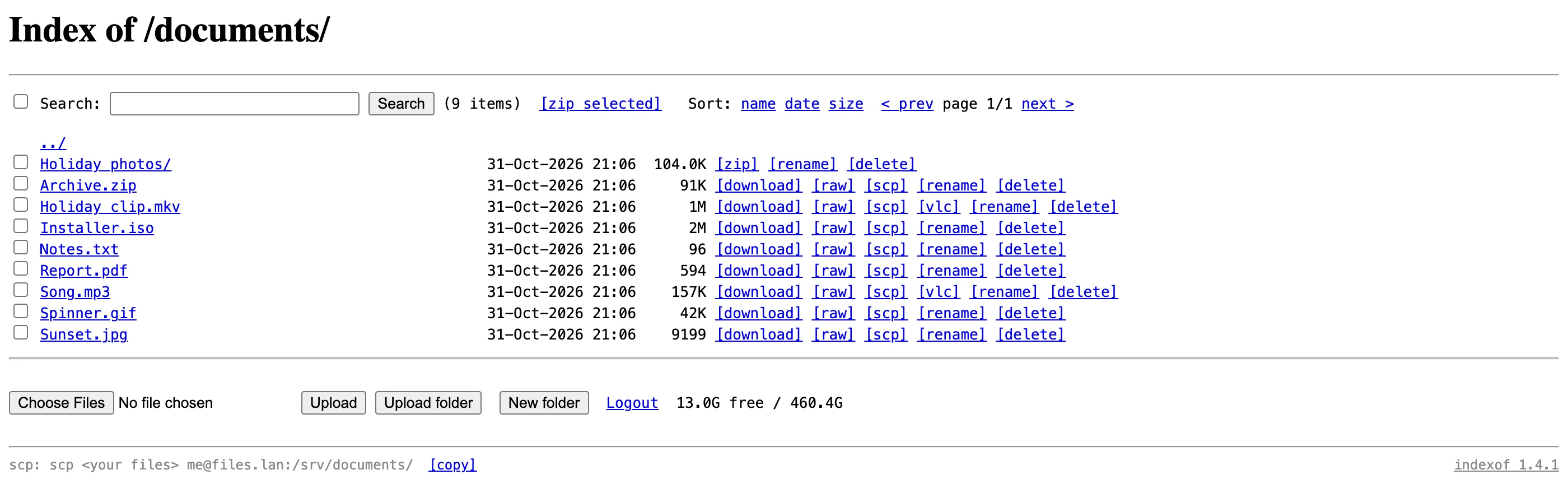
Nextcloud, File Browser and copyparty are good at what they do, and they do a lot: accounts, sharing, previews, thumbnails, apps. For one disk on a home server, shared with the household, most of that goes unused and all of it has to be kept up to date.
nginx already serves files and lists folders with autoindex. That page is fast, works on anything, and needs no maintenance. What it lacks is a handful of things you reach for every week:
- A password, so the listing is not open to the whole LAN.
- Search across the disk, folder sizes, free space.
- Uploading from the browser, renaming, deleting, in the folders where that is allowed.
- Downloading a folder as one zip.
- Opening a video or a song without downloading it first, in the browser when it can, in VLC when it cannot.
indexof adds exactly that list and nothing else. The listing stays nginx's listing.
Browser
    │  login (one shared password, cookie)
    │  listing, sort, filter, pages of 100
    │  uploads, rename, delete (WebDAV)
    │  play / view, signed 12-hour VLC links
    ▼
[nginx: "indexof" container] ── /data: your folders, mounted :ro or writable
    │
    │  internal network only, never published
    ▼
[helper container] ── free space, search, folder sizes
                      zips streamed as they are made
                      ffprobe / ffmpeg copy-only remux, text subtitles
- Never transcode. The player sends the file as it is. Chrome plays AAC, MP3, Opus and FLAC audio but not AC3, E-AC3 or DTS, so each audio track is marked with what will actually be heard. Another track means a copy-only remux (the same streams in a new container), never a re-encode; anything heavier goes to VLC.
-
Read-only mounts mean browse-only. A folder mounted
:rogets no upload line, no rename, no delete. Permissions are decided by the mount, not by a settings page, and the mount point itself can never be renamed, moved or deleted. - Zips are streamed, never stored. A folder is zipped as it is sent, uncompressed, without hidden files or symbolic links. Nothing lands on the server's disk and there is nothing to clean up.
-
VLC links are signed, for 12 hours, with their own key. A
vlc://link is valid for that one file, for reading only, until it expires. It is signed withINDEXOF_LINK_SECRET, not the password, so a shared link never leaks the login. -
The helper is on an internal network. Everything that runs a program (search, sizes, zips, ffprobe, ffmpeg) lives in a second container that only nginx can reach, and every path it receives is checked to be a real file under
/databefore anything runs. - Tested like it is meant to be used. Every pull request runs lint, a secret scan, a vulnerability scan of both images (Trivy) and an integration test of about 480 checks on generated demo data (odd file names, symbolic links, read-only folders, real media with several audio and subtitle tracks), plus a real browser checking what the page shows. Before 1.0.0, an independent attack on a running copy found no critical, high or medium issue.
- Plain, old-school look. No framework, no build step, no redesign. The page is the autoindex table plus a line of links above it, and it works in any browser.
git clone https://github.com/lborruto/indexof.git && cd indexof
cp .env.example .env
openssl rand -hex 32   # paste as INDEXOF_PASSWORD in .env
openssl rand -hex 32   # paste as INDEXOF_LINK_SECRET in .env
docker compose up -d
In compose.yaml, mount the folders to serve under /data, with :ro for the ones that should only be browsed:
volumes:
  - /srv/documents:/data/Documents
  - /srv/photos:/data/Photos:ro
  - /srv/share:/data/share
Open http://localhost:8099 and log in with the password. The home page lists the mounted folders. The README has the demo folder of generated files to try it without your own data, the VLC Link helpers for Mac and Windows, and the full list of settings.
Keep it on the home network or a VPN: indexof speaks plain HTTP and is not made to face the internet.
More in side-projects
Created 2026-10-31T12:45:13+01:00, updated 2026-10-31T15:54:41+01:00 · History · Edit